Skip to content

Switch from · Playnite

Coming from Playnite? Keep it. Add the rest.

Keep launching with it. Add your consoles, what you paid, and your library on any screen.

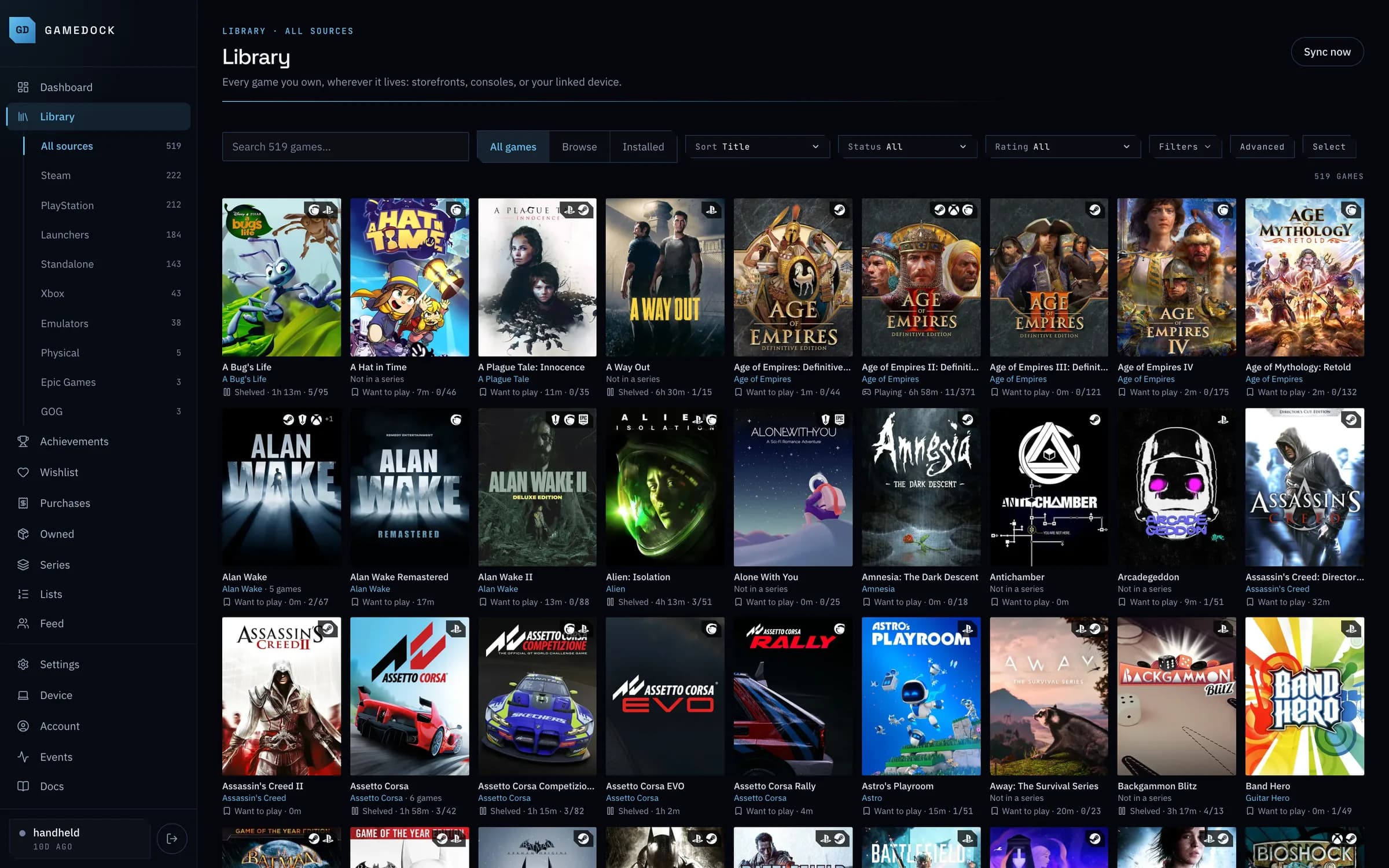
A GameDock library with games from Steam, PlayStation, Xbox, emulators and launchers in one grid.

Keep Playnite for

What it does best.

Actually launching your PC games from one place, with a controller-ready full-screen mode and deep theming.

  • Launching every PC game from one place
  • Its full-screen mode, made for a controller
  • Themes and community extensions
  • Adding any game by hand
  • Being open source

GameDock adds

Everything around it.

One library that fills itself in from every store you use.

  • PlayStation and Xbox libraries, with trophies and achievements merged in
  • What you paid on Steam, PlayStation, GOG and Epic Games
  • Every wishlist in one list, with price alerts
  • Series in release order, with what you are missing
  • Your library on your phone, in any browser
  • On a Linux PC or handheld: installs, drive space and save backups

Side by side

Where GameDock and Playnite differ.

Getting your library in

Automatic PlayStation syncGameDock: YesPlaynite: Partial

Titles, playtime and trophies pulled from your PSN account.

GameDock: Linked through the Companion; Sony asks you to sign in again every couple of months.

Playnite: Through a community plugin.

RetroAchievementsGameDock: YesPlaynite: Partial

Completion and badges from the RetroAchievements service.

Playnite: Progress through community achievement extensions.

Local installs on LinuxGameDock: YesPlaynite: No

Lutris and Heroic games, and standalone PC games, installed on your own Linux machine, desktop or handheld.

Playnite: Windows only, with a Linux version planned but not dated. On Linux, Heroic and Lutris do this themselves.

Physical mediaGameDock: YesPlaynite: Partial

Recording a disc, cartridge or boxed copy you own.

GameDock: Scan the barcode with your phone or search for it, with its edition, console and what it cost, beside your digital games.

Manual entry for anything elseGameDock: NoPlaynite: Yes

Adding a game by hand for a platform the tool cannot reach, such as a Switch game or an old PC game.

GameDock: Discs and cartridges only, for now. Adding any game by hand is next on GameDock's roadmap.

What it knows about how you play

Unified playtime across platformsGameDock: YesPlaynite: Partial

One hour count per game, summed across every platform you played it on.

Playnite: Tracks games launched through Playnite and imports the playtime Steam, GOG, Epic and Xbox report, but each store's copy keeps its own count.

Per-source playtime splitGameDock: YesPlaynite: No

Seeing that you put 40 hours into a game on PlayStation and 6 on PC, rather than one merged number.

Play status you don’t maintainGameDock: YesPlaynite: Partial

Playing, want to play, completed or shelved, derived from real activity instead of a status you keep honest yourself, with beaten and abandoned a click away.

GameDock: Worked out from recent play, and yours to set by hand on any game, then hand back.

Playnite: Can set a status of your choice the first time you play a game; other changes are by hand.

Time-to-beat estimatesGameDock: YesPlaynite: Partial

How long a game takes, shown next to it when you are deciding what to start.

GameDock: Player-submitted times from IGDB.

Playnite: HowLongToBeat times, through a community extension.

Achievements and trophies

Unified achievements across platformsGameDock: YesPlaynite: Partial

One completion figure per game regardless of where the unlocks happened.

GameDock: Steam, PlayStation, Xbox, RetroAchievements, standalone PC games and the PS3 and Xbox 360 emulators, with each achievement counted once however many platforms have it. GOG too, secret achievements included, and Epic achievements read from your own browser.

Playnite: Through community extensions such as SuccessStory and Playnite Achievements.

Xbox 360-era achievementsGameDock: YesPlaynite: Partial

The 360 back catalogue and its original icon art, not just modern Xbox.

Playnite: Through community achievement extensions.

Achievements standalone PC games keep locallyGameDock: YesPlaynite: No

Achievements that PC games installed outside a store launcher keep in files on disk, which no cloud API can see.

GameDock: Reads the achievement files a game already keeps on your PC. GameDock changes nothing in the game, and cannot unlock official Steam achievements.

Rarity-weighted scoringGameDock: NoPlaynite: Partial

A points system that values rare unlocks above common ones.

GameDock: Trophy grades are shown, but there is no rarity score.

Playnite: Through the Playnite Achievements community extension.

What you paid, and what it is worth now

What each game actually cost youGameDock: YesPlaynite: No

The figure on your receipt, matched to the game it bought, rather than an estimate from today's store price.

Spend across more than one storefrontGameDock: YesPlaynite: No

Money from several stores reconciled into one ledger.

GameDock: Steam wallet history and licences, PlayStation order history, GOG and Epic orders, and physical copies you entered.

Subscription claims and top-ups kept out of spendGameDock: YesPlaynite: No

A PS Plus monthly claim is not a purchase, and a wallet top-up is not a second purchase. Counting either inflates the number.

Converted at the rate on the purchase dateGameDock: YesPlaynite: No

An account billed in pounds and displayed in dollars, converted at the rate on the day of that purchase rather than today's.

Current library value, with historyGameDock: YesPlaynite: No

What your owned games and DLC would cost at today's store prices, and the trend.

GameDock: Steam, PlayStation, GOG and Epic prices, checked daily, or twice a day on Plus.

Live wishlist prices and discountsGameDock: YesPlaynite: Partial

Your wishlist with current regional pricing and deal context attached.

GameDock: Steam, PlayStation, GOG and Epic Games wishlists, at each store's price in your region.

Playnite: Through the IsThereAnyDeal community extension.

Target price alertsGameDock: YesPlaynite: Partial

Tell it your number, get told when a game reaches it.

GameDock: Shown on your dashboard and beside Wishlist. Five at once on the free plan, unlimited on Plus.

Playnite: Discount alerts through a community extension, set as a percentage rather than a price.

Write to your wishlist, or redeem a keyGameDock: YesPlaynite: No

Adding a game to the real Steam wishlist, or registering a product key, from inside the tracker.

Organising a library that got out of hand

One card per game across platformsGameDock: YesPlaynite: Partial

Owning a game on Steam, PlayStation and Xbox shows as one entry with merged unlocks, not three rows.

GameDock: Careful on purpose: remasters stay separate, and a join you disagree with can be undone.

Playnite: Duplicate copies can be hidden behind one entry with a community extension.

Reversible manual join and splitGameDock: YesPlaynite: No

Joining two cards that are the same game, or separating two that are not, for your account only, and undoable.

Series runs, including what you are missingGameDock: YesPlaynite: No

A franchise sorting as one run rather than scattering across four letters, with the entries you do not own shown alongside the ones you do.

GameDock: A series and how many of its games you own are free; which games you are missing is part of Plus.

The machine you actually play on

Disk usage and moving installs between drivesGameDock: YesPlaynite: Partial

What each volume holds, and relocating install trees from one to another with the configs rewritten so they still launch.

GameDock: Seeing your drives is free; moving Lutris games between them is part of Plus. Steam moves its own games.

Playnite: Shows how much space each game takes, but does not move installs between drives.

Versioned save backupsGameDock: YesPlaynite: Partial

Save files backed up off the device, with history rather than one overwritten copy.

GameDock: Standalone PC games, Steam games and emulators, backed up after you play. Three versions of each game on the free plan, ten on Plus.

Playnite: Through the Ludusavi community extension.

Linux desktop and handheld supportGameDock: YesPlaynite: No

An app on the computer you play on: any modern 64-bit Linux, from a desktop tower to a handheld.

Windows or macOS agentGameDock: NoPlaynite: Yes

The same local awareness on a Windows or Mac machine.

GameDock: Linux only for now. Windows is next on GameDock's roadmap, then macOS.

Playnite: Windows 10 and 11.

Sharing it, and getting your data out

Public profileGameDock: YesPlaynite: No

A page other people can look at.

GameDock: Opt-in, part by part: library, playtime, achievements, ratings and reviews, lists, activity and wishlist. Spending, prices and devices are never on it.

Ratings and written reviewsGameDock: YesPlaynite: Partial

Scoring a game, and saying something about it other people can read.

GameDock: Ratings in half stars, one review per game with spoilers folded and the hours you really played, private notes on any game, and a public page for each game with its community rating from public ratings and its reviews.

Playnite: Personal scores and private notes, not reviews.

Friends, feeds and leaderboardsGameDock: YesPlaynite: No

Following people, seeing what they are playing, and ranking against them.

GameDock: Follow people and see what they play, rate, review and list in one feed, as far as each shares it; people who follow each other are friends. Leaderboards rank store-recorded achievements and 100% games against the people you follow, and against everyone who opts in; never playtime.

Curated lists you can shareGameDock: YesPlaynite: Partial

Building a themed set of games and handing someone the link.

GameDock: Ranked or unranked lists of games from your library, with a note on each game. Each list has its own page, shared with friends, with everyone or with nobody.

Playnite: Categories and filter presets on your PC; sharing them needs an export extension.

Spend data has no public settingGameDock: YesPlaynite: Not applicable

Not just private by default: there is no way to share it at all, because what you spend is nobody else's business.

GameDock: The others here do not collect what you paid, so the question does not come up.

Data exportGameDock: YesPlaynite: Partial

Getting your library back out in a format you can keep.

GameDock: Everything you can see, as one file or a spreadsheet per part, on both plans, plus a read-only API.

Playnite: Through community export extensions.

Open sourceGameDock: NoPlaynite: Yes

Source you can read, fork or self-host.

Playnite: MIT licensed, built mainly by one developer, with a large community of extensions and themes.

Every point, against every tool

Using both

Nothing to export. Nothing to give up.

  1. 01

    Connect the same stores

    GameDock reads them directly, so your library builds itself. There is nothing to export or import.

  2. 02

    Let it fill in

    Your games, playtime and achievements arrive, each game once however many places you own it.

  3. 03

    Keep what you like

    Carry on using it for what it does best. GameDock keeps the record of everything.

Questions

Before you try it.

Does it replace Playnite, Backloggd or Exophase?

No. Each of those does its own job well: Playnite launches games on Windows, Backloggd is for reviews and a community, and Exophase is for achievement hunting. GameDock is the library that joins your stores together, and plenty of people use it alongside them. The compare page goes through each one.

Why does it connect through my browser, instead of me adding games?

Adding games by hand takes hours and is out of date the next time you buy something. Reading a store's public profile misses private accounts, what you paid and anything the store keeps to itself. GameDock reads from the stores you are already signed in to in your own browser, so it sees what you see, keeps itself up to date, and never needs your passwords.

What does it cost?

The free plan covers your whole library: every store, every game, every achievement and an export of all of it, with no size limit, no time limit and no card. Running a service like GameDock has real costs, so a few extras only some people want are part of GameDock Plus, at $5.99 a month or $53.90 a year. Plus syncs Steam more often, keeps your full purchase and value history instead of the last 12 months, sends a daily digest email, names the games missing from a series, and lets GameDock make changes on your Linux PC. The free plan's limits are 50 discs, 5 price alerts, one Linux PC, 3 saved versions of each game's saves and one hand-started Steam and price sync a day; Plus lifts or raises each. Paying for those keeps the rest free for everyone. The full list is on the pricing page.

Keep Playnite. See everything.